

Get from empty store to “ready to sell” without guessing what is missing. The Onboarding app mounts a Store Readiness panel on Dashboard home and marks steps done from live GraphQL — not from “Mark as done.”
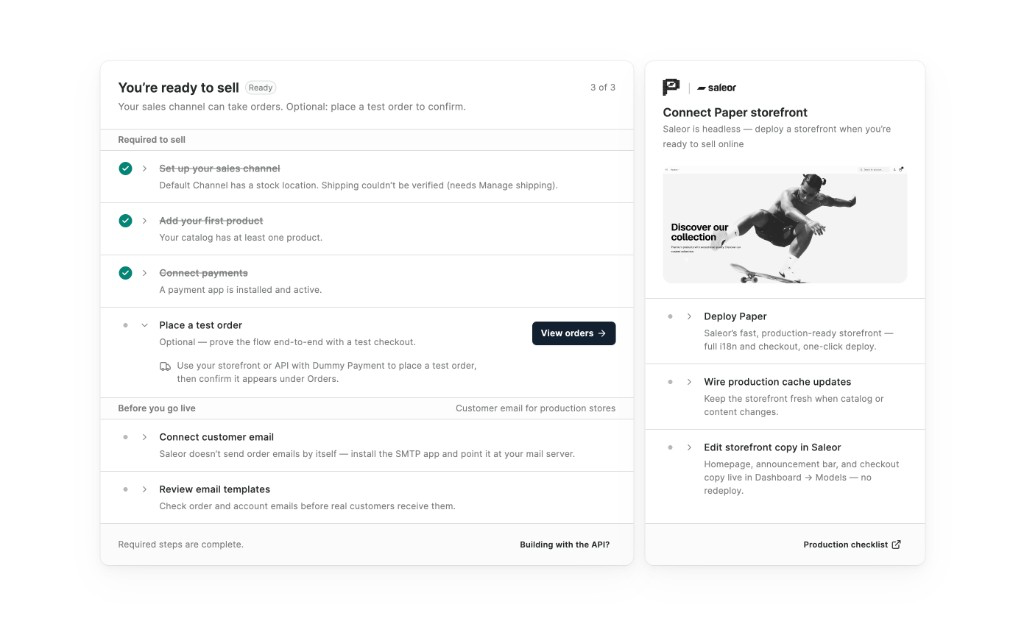
Required to sell
Three steps unlock checkout. Each one deep-links into the Dashboard so you finish setup where it belongs:
- Set up your sales channel — currency, stock location, and shipping
- Add your first product — something to sell, priced and published
- Connect payments — Dummy Payment to test, or a real payment app for live charges
Place a test order is optional — prove the flow end-to-end, then confirm it under Orders.
Before you go live
Once required steps are done, the guide covers production follow-ups that Saleor does not do alone:
- Connect customer email — install SMTP so order and account mail actually send
- Review email templates — check copy before real customers see it
- Connect Paper storefront — deploy Saleor’s production-ready storefront, wire cache updates, and edit homepage copy from Dashboard Models
Built for the home page — safe to remove
The app ships as a HOMEPAGE_WIDGETS extension (“Get ready to sell”). It has no webhooks and no backend of its own — GraphQL runs in the browser with your staff token. Preferences stay in user metadata. When you no longer need the guide, uninstall it; your catalog, orders, and configuration stay put.
Builder shortcuts (GraphQL playground, custom app token, invite staff) live under Building with the API? so merchants stay focused on commerce first.